
Introduction
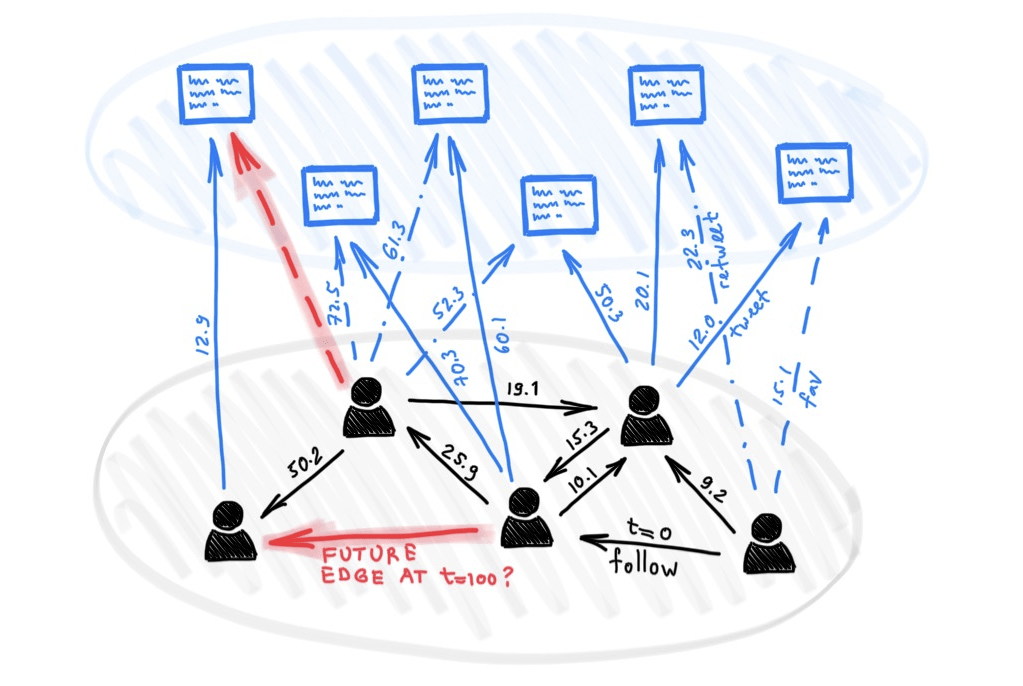
Due to the increasing connectivity in the world, graph data has manifested itself in many contexts, particularly in recent years. Analyzing interactions within graphs makes for an interesting exploration across many applications. While many studies concentrate on static graphs, the changing nature of data requires examining how interactions within a graph change over time. Traditional Graph Neural Networks (GNNs) are not necessarily capable of capturing temporal and dynamic interactions within graphs, due to their underlying assumptions of a ‘fixed structure’. As a result, Temporal Graph Neural Networks (TGNs) have been developed to leverage the existence of temporal dynamics within such evolving structures.
Temporal Graph Neural Networks

A graph is generally modeled by three main components: [V, E, X], where V represents the set of nodes (i.e. entities) present within the graph, while E is the set of edges that connect the nodes, and X is the set of attributes associated with each node. For dynamic graphs, there is the added component of snapshots, denoted by S, where each snapshot represents the graph at time t. TGNs often iteratively process snapshots of the dynamic graph to analyze the interactions within the graph over time, while updating the embeddings of the nodes based on the new information processed over time. This can ultimately be applied to various tasks such as link prediction, anomaly detection, classification, and so on.
Implementing Temporal Graph Neural Networks
1. Setting up the required libraries
We will use TGNs for the anomaly detection task, as an example to showcase the applications of TGNs.
!pip install torch
!pip install torch-geometric
!pip install torch_geometric_temporal
!pip install keras
!pip install sklearn
!pip install numpy

import torch
from torch.nn import Module
from torch_geometric_temporal.nn.recurrent import GConvGRU
from torch_geometric.datasets import EllipticBitcoinTemporalDataset
from torch_geometric.data import Data
from keras.layers import Input, Dense
from keras.models import Model
import numpy as np
from sklearn.model_selection import train_test_split
2. Importing and processing the dataset
After installing and importing the required libraries, the dataset we will use for this tutorial is the ‘EllipticBitcoinTemporal’ dataset, an integrated dataset within the torch_geometric library. The dataset models Bitcoin transactions (edges) between entities (nodes), associated with a time-step between 1 to 49, where fraudulent nodes are labelled as illicit (2%), while the rest of the nodes are either licit or unknown. The original dataset has the following characteristics:
| # Nodes | # Edges | # Features | # Classes |
| 203,769 | 234,355 | 165 | 2 |
For the purposes of this tutorial, we will use a portion of this dataset – specifically 5 time-steps:
snapshots = []
for i in range(1,5):
 dataset = EllipticBitcoinTemporalDataset(root='/tmp/EllipticBitcoinDataset',t=i)[0]
 snapshots.append(dataset)

#To extract the y values (class values) corresponding to the unique existing nodes in the 5 extracted snapshots, we combine the snapshots into one graph (similar to concatenating two lists), keeping track of how many unique nodes were added with each new snapshot, to ultimately extract the corresponding label from the original data.

def combine_graphs(graph_snapshots):
    # Initialize empty list to hold the combined data
    combined_y = []

    node_offset = 0  # Keep track of how many nodes have been added

    for graph in graph_snapshots:
        # Combine labels
        combined_y.append(graph.y)

        # Update the node offset for the next graph
        node_offset += graph.x.size(0)

    # Concatenate all y-values
    combined_y = torch.cat(combined_y, dim=0)  # Adjust dim based on your task

    return combined_y

y_true = [int(value) for value in combine_graphs(snapshots)]
y_true = [1 if x == 1 else 0 for x in y_values]
3. Defining the TGN Model to generate an aggregated embedding representation for each node across all snapshots
num_snapshots = 0
for snap in snapshots:
 num_snapshots+=1

node_features_dim = 165
hidden_dim = 200
num_epochs = 5
learning_rate = 0.01
total_nodes = 24738  # Make sure this is the maximum number of unique nodes across all snapshots, in this case there are 24,738 unique nodes across the 5 snapshots used for this tutorial

class CustomTemporalModel(Module):
   def __init__(self, node_features_dim, hidden_dim, total_nodes):
       super(CustomTemporalModel, self).__init__()
       self.gconv_gru = GConvGRU(node_features_dim, hidden_dim, 1)
       self.total_nodes = total_nodes
       self.node_embedding = torch.nn.Embedding(num_embeddings=total_nodes, embedding_dim=hidden_dim)
       # Initialize embeddings to zero
       self.node_embedding.weight.data = torch.zeros(total_nodes, hidden_dim)


   def forward(self, snapshot_batches):
       presence_mask = torch.zeros(self.total_nodes, dtype=torch.bool)

       for x_tensor, edge_index_tensor in snapshot_batches:
           node_indices = edge_index_tensor.unique()
           presence_mask[node_indices] = True  # Update presence mask

           embedding = self.gconv_gru(x_tensor, edge_index_tensor, None)
           # Update embeddings for nodes in the current snapshot
           self.node_embedding.weight.data[node_indices] = embedding

       # Use the presence_mask to calculate a weighted average or another sophisticated aggregation
       # Here, you need to decide how to aggregate taking presence_mask into account
       # For example, simply ignoring non-present nodes:
       aggregated_embeddings = self.node_embedding.weight.data[presence_mask]

       return aggregated_embeddings

device = torch.device("cuda" if torch.cuda.is_available() else "cpu")
model = CustomTemporalModel(node_features_dim, hidden_dim, total_nodes).to(device)
optimizer = torch.optim.Adam(model.parameters(), lr=learning_rate)
4. Training the TGN Model
num_epochs = 5
model.train()
for epoch in range(num_epochs):
   optimizer.zero_grad()
   snapshot_batches = []
   for snapshot in snapshots:
       x = snapshot.x.to(device)
       edge_index = snapshot.edge_index.to(device)
       snapshot_batches.append((x, edge_index))
   aggregated_embeddings = model(snapshot_batches)
   optimizer.step()
   print(f'Epoch {epoch} completed')

final_embeddings_numpy = aggregated_embeddings.detach().numpy()
5. Identifying anomalies through autoencoder reconstruction error
# Define the size of our embeddings
input_dim = final_embeddings_numpy.shape[1]  # embedding_dimension
encoding_dim = 100 # or choose based on your dataset

# Define the input layer
input_layer = Input(shape=(input_dim,))

# Encoder
encoded = Dense(encoding_dim, activation='relu')(input_layer)

# Decoder
decoded = Dense(input_dim, activation='sigmoid')(encoded)

# Autoencoder
autoencoder = Model(input_layer, decoded)

# Compile the model
autoencoder.compile(optimizer='adam', loss='mean_squared_error')

# Split the data
X_train, X_val = train_test_split(final_embeddings_numpy, test_size=0.2, random_state=42)

autoencoder.fit(X_train, X_train,
               epochs=25,
               batch_size=256,
               shuffle=True,
               validation_data=(X_val, X_val))

# Reconstruct embeddings
reconstructed_embeddings = autoencoder.predict(final_embeddings_numpy)

# Calculate mean squared error (MSE) as reconstruction error
reconstruction_error = np.mean(np.power(final_embeddings_numpy - reconstructed_embeddings, 2), axis=1)

threshold = np.mean(reconstruction_error) + np.std(reconstruction_error)
# Flag embeddings with errors above the threshold as anomalies
anomalies = reconstruction_error > threshold
6. Evaluating Outcome Using ROC-AUC Score/Curve
Since this is an anomaly detection task, we will use the Receiver Operating Characteristic (ROC) area under the curve (AUC) scores for evaluation. The ROC curve compares false positive rates against true positive rates, with a `positive’ label representing an anomaly.
import matplotlib.pyplot as plt
from sklearn.metrics import roc_curve, auc
import numpy as np

#generating the ROC curve using the y_true values from the original dataset, and the reconstruction error scores extracted from the previous step
plt.figure(figsize=(8, 6))
fpr, tpr, thresholds = roc_curve(y_true, reconstruction_error)
roc_auc = auc(fpr, tpr)
print('ROC AUC Score = ', roc_auc)

plt.plot(fpr, tpr, color='darkblue',linestyle=':', lw=1.75)
plt.plot([0, 1], [0, 1], color='black', lw=1, linestyle='--')
plt.xlim([0.0, 1.0])
plt.ylim([0.0, 1.05])
plt.xlabel('False Positive Rate',fontsize=15)
plt.ylabel('True Positive Rate',fontsize=15)

plt.show()

Results
The output of the evaluation code is showcased in Figure 3. As shown, the ROC-AUC score achieved by the model is 0.58. This means that the model performs better than a random classifier at detecting anomalies in the dataset, which is very promising, particularly since anomaly detection datasets, such as the one used here, are highly imbalanced with a small number of anomalies. This is a basic tutorial that introduces using a TGN for anomaly detection using only a subset of the data, and by using one setting for hyperparameters such as hidden_dim, num_epochs, learning rate etc. For your application, it is important to experiment with different settings for optimal performance of the model in your task.
Conclusion
In the tutorial above, we introduced how TGNs work and applied it to the anomaly detection task. This is a simple introduction of some of the functionalities of TGNs, and how we can leverage some of the temporal aspects of dynamic graphs to effectively detect anomalous nodes. Using this tutorial as your starting point, you can explore the TGN’s functionalities and extend it to any task to test its effectiveness in different contexts.


 Kurban Intelligence Lab